
What Is an ERP System, and Does Your UK Business Actually Need One?
Key takeaways
- An ERP system runs finance, stock, purchasing, sales and reporting on one shared set of data, so nobody re-keys the same transaction.
- Businesses often move to ERP when spreadsheets and separate tools stop agreeing with each other, not because of one big failure.
- Microsoft Dynamics 365 Business Central is Microsoft's business management solution for small and mid-sized organisations.
- The software is the easy part. Process design, clean data and training decide whether a project lands well.
- Before you look at any product, time your month end, count your spreadsheets and list your workarounds.
What an ERP system is, and what it is not
ERP stands for enterprise resource planning. In plain terms it is one system that runs the core of the business: the ledgers, stock, purchasing, sales and the reports the leadership team reads. Microsoft describes Business Central as a solution that "enables companies to manage their business, including finance, manufacturing, sales, shipping, project management, services, and more" [1].
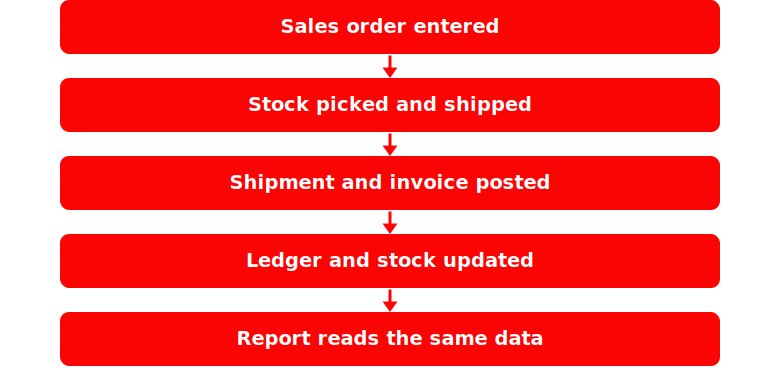
The key part is the shared data. When an order is posted, the same transaction moves stock, creates what the customer owes and lands in the ledger. Nobody keys it twice and nobody works from a different version of the number. Microsoft notes that inventory increases and decreases are recorded when you post purchase and sales documents [3].
What an ERP is not is a bigger accounting package. If your finance system only does the books, and stock, orders and reporting live in other tools or spreadsheets, you have a set of separate systems joined together by exports.
The core areas an ERP covers
Products split their modules differently, but the core areas are much the same:
- Finance: the general ledger, the chart of accounts, VAT, bank reconciliation and the month end [2].
- Inventory: what you hold, where it is and what it is worth [3].
- Purchasing: suppliers, purchase orders and goods received.
- Sales: quotes, orders, invoices and what customers owe you.
- Reporting: the numbers leadership needs, built from the same data everyone else uses.
One transaction, one record: how an order flows through an ERP without being keyed again [1][3].
How ERP differs from standalone accounting software
The difference is where the data lives. With standalone accounting software, finance sees the numbers but the warehouse works from a spreadsheet, sales quotes from its own price list and the management pack is assembled by hand at month end.
With an ERP, those areas write to the same record. Microsoft also points out that Business Central works with Outlook, Excel and Teams, so people get the information they need "without switching between applications" [1].
| Question | Standalone accounting | ERP |
|---|---|---|
| Where does stock live? | A separate tool or spreadsheet | In the same system as the ledger |
| Who keys a sales order? | Often keyed again by finance | Keyed once, posted through |
| Where do reports come from? | Exports joined by hand | The shared data |
The signs your business has outgrown spreadsheets
In our experience it is rarely one big problem. It is a lot of small ones that have become normal: keying the same purchase order twice, a report that takes days to assemble, two people giving different stock figures for the same item.
If your month end depends on one person and falls apart when they are off, or your stock figure needs a physical count before anyone trusts it, those are real signals. The useful question is how much time each month goes into reconciling data between systems rather than using it.
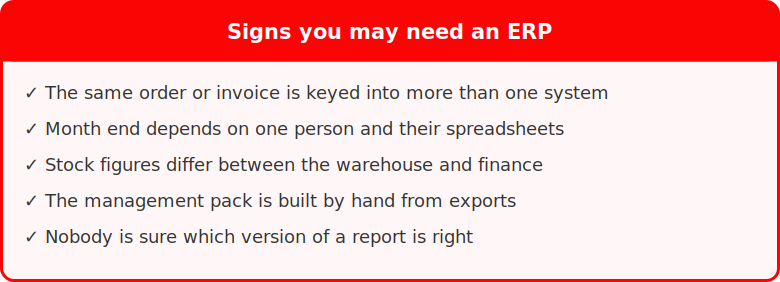
Five everyday signs that separate systems are costing you time.
Cloud or your own servers
Business Central runs online, and Microsoft's own guide notes that some organisations use "Business Central on-premises" [1]. For an on premises install, Microsoft says the components "can be installed on one, two, or three machines in any combination" [4]. Online means no servers to buy or patch; the choice should follow your own integration and data needs.
How to evaluate ERP products
Before you score any software, time your month end, count the spreadsheets and list the workarounds. Those three exercises tell you more about your requirements than a long feature list.
The short checklist we use: does it handle UK VAT out of the box (Business Central sets VAT rates up inside the product [5]), does it work with the Microsoft 365 tools your team already uses [1], and is there a clear plan for data, testing and training? We go through the full process in our ERP review guide.
What an implementation really looks like
The software is the easy part. The work is agreeing how your processes should run, cleaning the data you bring across and training the team. We would not sign off testing until your team has run a real month end and a VAT return in the test system. Our Business Central implementation guide walks through each stage.
To find out how Amplio can help with choosing or moving to an ERP system, get in touch at www.ampliosolutions.co.uk.
Further reading
- ERP review: how UK SMBs should evaluate systems, https://www.ampliosolutions.co.uk/blog/erp-review-how-uk-smbs-should-evaluate-systems/
- Business Central implementation guide (UK), https://www.ampliosolutions.co.uk/blog/business-central-implementation-guide-uk/
Sources
- [1] Microsoft Learn, Welcome to Microsoft Dynamics 365 Business Central
- [2] Microsoft Learn, Finance overview, Business Central
- [3] Microsoft Learn, Manage inventory, Business Central
- [4] Microsoft Learn, Deployment scenarios, Business Central
- [5] Microsoft Learn, Set up calculations and posting methods for VAT